Wednesday, May 2, 2018

Google Local Business Knowledge Panel Not Showing - Try This Fix By Gordo Web Design

Google’s small business platform “Google Local My Business” (GMB) has been around a while now.  It’s come a long way from it’s quasi-social media roots to it’s now current form.  With all of the recent changes to the platform, it has become a little confusing how it all works.


About a week ago I noticed that my business’s Google Local My Business Knowledge Panel was not displaying (getting an empty white block).  Even if you would search my unique business name “Gordo Web Design“, all of the organic listings would populate, however no knowledge panel.  So I searched some other local businesses to be certain.  Sure enough, it was only our Knowledge Panel that was missing.


At first this seemed a little mysterious, I thought the absence of my panel was some kind of error or possibly some update Google made to the GMB platform that I wasn’t aware of.  Obviously this was not the case…  It didn’t take long for me to realize that we were under some type of Google penalty (ohhhhhh noooooo!).


What should you do if your Google Local Business Knowledge Panel is not showing? Here’s what I did!


Under the “info” section of GMB I noticed we had 4 categories listed:


  • Website Designer

  • Internet Marketing Agency

  • Graphic Designer

  • Advertising Agency

Upon careful consideration I decided to remove 2 of the 4 categories…  Within 90 seconds of removing the 2 categories, our “Gordo Web Design Knowledge Panel” returned in full.  Penalty lifted.


If your Google Local My Business Knowledge Panel Does Not Display, Try This.


  1. Login to your Google Local My Business manager account.

  2. Select “info” on the left side panel.

  3. Click the category edit button (looks like a pencil) under your business name (see screen shot).

  4. Select one primary category and up to one additional category for your business.
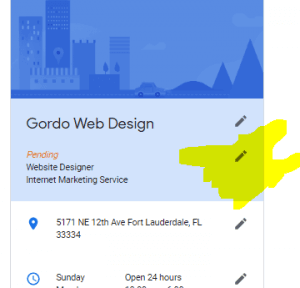
- Google Local Business Knowledge Panel Not Showing try this trick by gordo web design screen shot 300x288


Having more than 2 categories selected clearly affects your Google listing negatively.  Should we really call this a penalty though? Upon correction of the categories in the Google My Business “info” section, the penalty was literally removed instantaneously.


So there you go, an easy fix to a potentially mysterious problem.


Google Local Business Knowledge Panel Not Showing - Try This Fix By Gordo Web Design

Labels: , , , , , , ,

Sunday, September 3, 2017

K & M Realty Team


K & M Realty Team

Florida Keys Realty Group


Florida Keys Realty Group

Coastal Realty of the Florida Keys


Coastal Realty of the Florida Keys

Wednesday, July 5, 2017

What Is Search Engine Optimization (SEO)?

Search engine optimization, or SEO, is a digital marketing strategy used to gain visibility in organic search engine results. If you own a website, you need traffic to your site if you wish to share information, sell a product or service, or make money via ad revenue.


While there are other ways to boost traffic such as pay per click (PPC), these methods can be costly and ineffective long-term. When you use SEO, you have the potential to rank high in search engines like Google without spending a dime on premium advertising.


How does SEO Work?


Search engines use specialized formulas to analyze data from websites and determine which web pages match best with a web user’s search word or phrase. Web pages that rank high in the search engines often contain SEO techniques.


The goal of SEO is not to overload content with keywords. In fact, search engines will often penalize this behavior. Instead, you’ll want to keep it simple and choose 1 primary and up to five supporting keywords or key phrases for each page.


What are the Benefits of SEO?


  • Increased traffic

  • Cost-effective

  • Higher ROI

  • Better user experience

  • Brand awareness

  • More credibility

  • Permanent results

  • Higher conversation rates

  • Bypass competition

  • Long term success

  • No residual cost

Why Do You Need SEO?


The old motto ‘if you build it, they will come’ certainly doesn’t apply to websites. Without a solid strategy to gain readership, your website will likely never hit double digits in daily traffic. Optimizing your website can give you a prime advantage over non-optimized sites.


With billions of websites on the internet, you need yours to stand out. Competition in the digital world is fierce and only a well-designed, well-optimized website is going to cut it. Search engine optimization is a proven strategy that can boost growth with minimal risk. It is possible to get your website in one of Google’s exclusive top 5 spots. Good SEO can help you get there!


At Gordo Web Design we’ve spent years perfecting our methods and we still continue to improve them every day.  Let us put these methods to work for your business.  You will be happy with the results, just read our reviews and look at our portfolio for proof.


Give us a call today to learn more and get started!


(954) 501-0703


What Is Search Engine Optimization (SEO)?

Labels: , , , , , ,

Monday, May 1, 2017

DOES BLOGGING HELP SEO? – 3 SIMPLE ANSWERS

Does blogging help SEO?  Yes, of course blogging improves your SEO!  There are many reasons why blogging affects your SEO in a positive way. This article will touch base on 3 of those reasons.


1. Long tail keywords and originally written content is what google loves to serve


When you use unique words and phrases, google will help promote your content. Anything that is new and unused will get an applause from google. Try to find uncommon ways to get your point across. Think of creative content in your writing.


Don’t make the mistake of writing like a college research paper. Aim to write at a middle school level. It sounds strange to even mention, but your content should be readable to everyone. Remember, when someone searches online, they’re not going to dig into their college level English book to come up with a search term.


2. Natural use of relevant keyword phrases make effective SEO


A keyword phrase is a string of words that google uses to determine relevancy. This helps bring people to your website for something specific that they’re looking for. Perform a google search and see what people are searching by looking at keyword suggestions by google, this will give ideas on how other people word their searches. The more specific your keywords are to how they search, the more relevant traffic you will develop on your website. The more relevant traffic you have, the better your chances are for conversion to a subscriber or customer.


3. Long tail keywords reach a specific audience


Long tail keywords are the best way to reach a specific audience. Quality use of long tail keyword phrases in your blog title will directly affect your rating with google for that specific search term. Long tail keywords are just multiple keywords or phrases used together. They are precise and definitive to the audience you appeal to. For example, you want a potential consumer to buy your puppy food from your shop that contains many different puppy food brands, you would tailor your keywords to a specific brand rather than just advertising “puppy food”. You’d use a page title like, “Misa’s Delicious Puppy Crumbles are number one on the doggy ratings for puppy food”. This would help you capture specifically all the people searching for “Misa’s Delicious Puppy Crumbles”.


Blogging directly impacts your SEO


The idea is to write natural but to always include keywords and phrases. But it’s also important to connect to the reader and spark their interest in your website. Make your writing eye catching and intriguing. Grab their attention and reel them in with your creativity.


Does blogging help SEO?  Content is one of the most important elements google considers to determine your websites rank. So technically, blogging directly impacts your SEO. The more you blog, the more respect and trust you will gain with both the readers and from google.


Remember to use your individual writing style, keep the key phrases coming, and make sure your content is readable. Simple terms will attract a board range of readers. There is no set rules to building SEO, but blogging is a sure fire way to get the ball rolling in the right direction to be successful with your SEO campaign.


Thanks for reading,

Misa Rose


Misa Rose is an professional writer and SEO expert.  She writes commercially and specializes in website copy, blog articles, & product/service reviews.  She has a fine understanding of content marketing and its relationship to SEO.  If you would like to hire Misa for your next project please visit her website or e-mail her.


WEBSITE: http://seowriter.expert

E-MAIL: misarose@seowriter.expert


DOES BLOGGING HELP SEO? – 3 SIMPLE ANSWERS

Labels: , , , ,

Saturday, March 18, 2017

How To Setup Office 365 on Gmail

If you are like us, you probably prefer the Gmail email application over the Microsoft email application.  It’s not that Office 365 is in any way inadequate, besides it’s lousey search function and horrid contact management.  We just prefer the simplicity of Google’s Gmail; the layout is clean, the search function is genious, and the automatic filtering/sorting of emails into tabs is amazing.


MS Office 365 on Google Gmail


The great part about using Office 365 to send emails is the robust Microsoft server and security that goes into your email service.  By utilizing the google interface, you do not sacrifice any of these innate benefits.  There are only things to gain by using gmail with a Microsoft 365 email.


In Short, yes, you can use your personalized domain email address on the Microsoft 365 email service provider all while leveraging Google’s gmail interface and features.


Here’s how:


  1. Login to gmail using any google account

  2. Go to Gmail app www.gmail.com

  3. Select the settings gear and click “settings”

  4. Select “Accounts and Imports“

  5. Where it says Check mail from other accounts, Select “Add a mail account“

  6. Enter your email address in the next window

  7. Select POP3 or Gmailify

  8. Enter your credentials into the respective fields
    • Username

    • Password

    • POP Server : “outlook.office365.com“

    • Port: “995“

    • SSL?


  9. Select “Add Account“


Need help? Contact us, we are happy to assist!


Tel: (954) 501-0703

Email: info@gordowebdesign.com


How To Setup Office 365 on Gmail

Labels: , , ,